Response targets
First-response targets for every priority, with a warning before they slip
Promise clients a first reply within a set time for each priority: the SLA in your support agreement. Navbatly works out when each reply is due, warns you before it's late, and tells you if it is.
How it works
-
Set targets on your plans
A target per priority, like 1 hour for urgent, 4 for high, 8 for normal and 24 for low. A new contract copies its plan's targets, and you can change them per contract.
-
Each request gets a due time
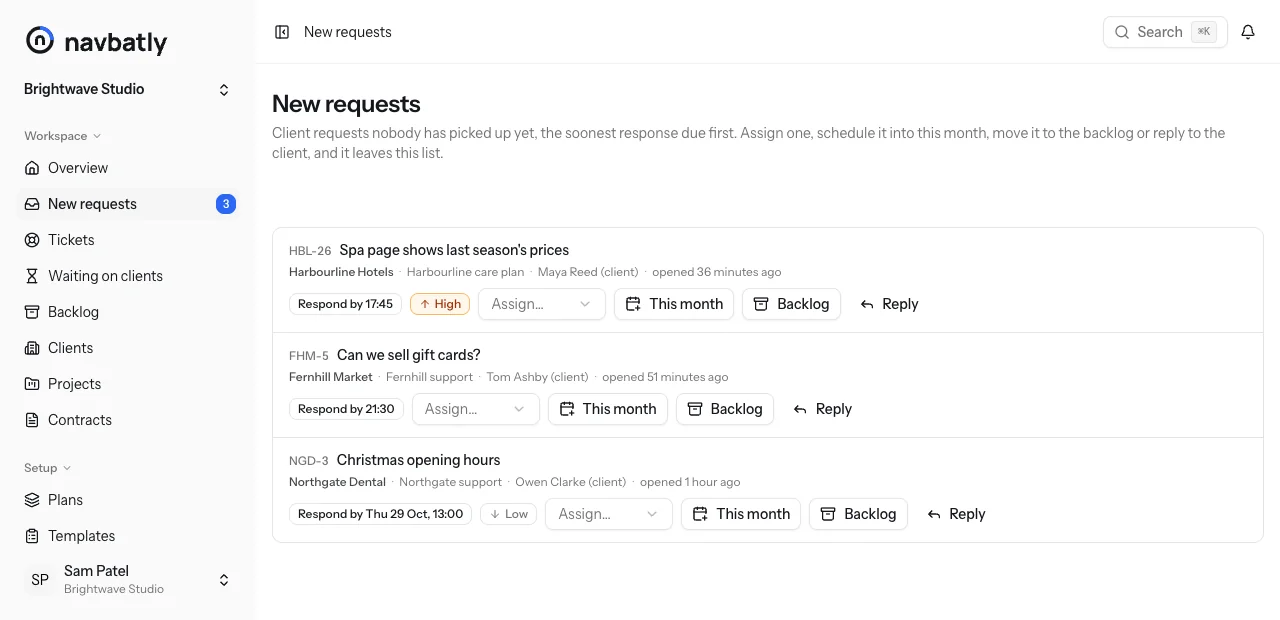
When a client request comes in, from their link or by email, Navbatly sets when its first reply is due from its priority and its contract's target.
-
A warning before it's late
Whoever has the ticket gets a warning an hour before the reply is due, or half way through a shorter target, and a notice if it goes past.
-
Answered, and it's settled
Once you reply, ask the client for something or move the ticket on from Open, the due time is fixed and counts as met or missed.
Where you see it
-
New requests
Requests nobody has picked up yet, soonest reply due first, with the time beside each one.
-
On every ticket
A badge with the time the reply is due, or that it is overdue. The ticket list can show only overdue ones.
-
On the client's report
How many of the month's requests got a first reply within the agreed time, so the client sees you keep your promise.
What counts as a first response
The first of these stops the clock:
- A reply to the client
- An email reply from the ticket that was actually delivered.
- Asking the client for something
- The first client action asked of someone with an email address.
- Moving the ticket on
- The first move out of Open, to in progress, testing, waiting on client or done.
Questions about response targets
Do nights and weekends count?
Yes. Targets run on the clock, nights and weekends included, so set them to match what your agreement promises.
What if the priority changes before we reply?
The due time follows the new priority, and the contract's target for it, until the first response. After that it is fixed.
Does every ticket get a due time?
Every client request on a contract with a target for its priority does. Sub-tickets, tickets opened by a schedule and work logged after the fact don't.
Who gets the warning?
Whoever the ticket is assigned to, then whoever opened it, otherwise the team's owners and admins.
Keep the promise in your support agreement
Create a team, set targets on your plans, and every new request gets its reply-by time.