Hours that bill correctly
Track retainer hours, rollover and overage month by month
If you sell a support retainer, a set number of hours a month, Navbatly keeps it as a support contract with a monthly allowance. Every hour you log counts against the right month, unused hours can roll over, and you decide what happens when a month runs over.
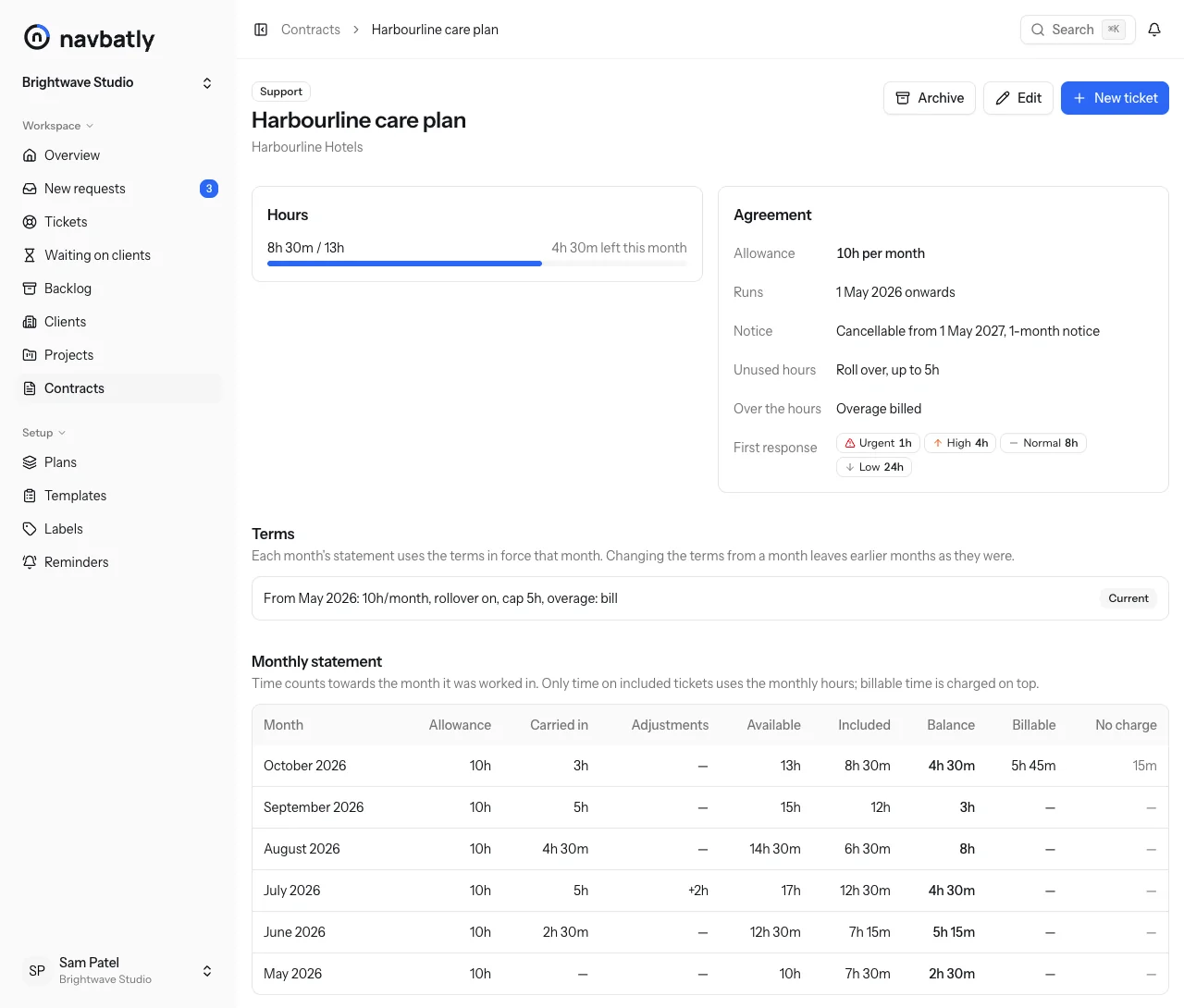
The month the time was worked is the month it counts
A ticket opened in September and finished in October uses September's hours for September's work and October's for October's. Estimates never count, so planning ahead costs the client nothing.
Each month's statement shows the allowance, the hours carried in, any adjustment, what was available, what was used, and what is left to carry on.
- Allowance
- 10h
- Carried in from September
- +3h
- Available
- 13h
With 8h 30m used, 4h 30m is left, and all of it rolls into November: the cap is 5h.
You choose what happens to overage
Set it per contract. Each month's statement and the client's report say what happened.
-
Show it
The month shows as over and the next month starts from its full allowance. Nothing is billed, carried or written off.
-
Bill it
Included time beyond the month's hours becomes billable that month.
-
Carry it
The overage is taken from next month's hours. In the contract's last month it is billed instead.
-
Write it off
Included time beyond the month's hours is written off.
Everything a retainer needs
-
Rollover with a cap
Let unused hours carry into next month, up to a cap if you set one.
-
Adjustments
Add or remove hours for a month with a reason, such as goodwill after an outage or an agreed overage.
-
Terms that change from a month
Change the allowance, rollover or overage from a month on. Earlier months keep the terms they had.
-
Included, billable or no charge
Each ticket and each time entry is charged one way, so billable work on top never eats the allowance.
-
Plans you set up once
Your support tiers, with their hours, minimum term and notice. A new contract copies its plan's terms.
-
CSV for invoicing
Export a month's hours by contract, or every time entry, for your accounts.
The words Navbatly uses
- Support contract
- A contract with a monthly allowance of hours, optionally rolling unused hours over. What many agencies call a retainer.
- Project contract
- A contract with a fixed budget of hours for a defined piece of work.
- Task contract
- A contract for work charged by the hour, with no allowance or budget.
- Allowance
- The hours a support contract includes each month.
- Rollover
- Unused allowance carried into the following month, possibly up to a cap.
- Overage
- Included time beyond the hours a support contract has available in a month. The overage policy says what happens to it.
- Adjustment
- A manual change, with a reason, to the hours a support contract has in one month.
- Statement
- A support contract's account for one month: allowance, rollover in, adjustments, time used and what remains.
Questions about retainer hours
Do estimates use up the client's hours?
No. Estimates never count, in the backlog or anywhere else. Only logged time does.
What happens to earlier months if I change the terms?
Nothing. New terms apply from the month you choose, and reports you already sent stay the same.
What if a ticket should have been billable?
Change how it is charged. That applies to its time from the start of this month on; earlier months keep how they were charged unless you choose to apply it to them too.
Does the client see their hours?
Yes. Their monthly report shows the hours used and left, and their private link shows the same.
Can one client have several contracts?
Yes. A support plan and a project budget at the same time, for example. Each ticket counts against one of them.
Know where every retainer stands
Create a team, set up your plans once, and add your first support contract.